

Settings
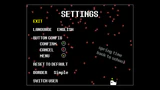
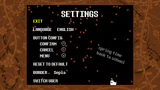
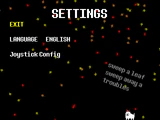
The SETTINGS is a menu accessible from the Main Menu. Consistent across all versions of Undertale, it allows players to change the game's language between English and Japanese. The console versions include additional button configurations and an option to change the border around the game window. The Settings menu also exclusively features seasonal changes.
On the PC versions of Undertale, an option called Joystick Config appears under the "LANGUAGE" switcher if a compatible controller is connected when the game launches. The player has several options for remapping the gamepad to use it instead of the keyboard. This menu also has a control test for checking that the buttons are remapped correctly.
In the order they appear on the menu, the options are as follows:
- EXIT
| Function | Key | These options allow the player to remap 3 buttons on the gamepad to CONFIRM, CANCEL, and MENU. |
|---|---|---|
| CONFIRM | Z/ENTER | |
| CANCEL | X/SHIFT | |
| MENU | C/CTRL |

- ANALOG SENSITIVITY: This slider allows the player to adjust the sensitivity for the analog stick.
- ANALOG SENSITIVITY SENSITIVITY: This slider controls how fast the analog sensitivity slider slides; oddly, the large end of this slider corresponds to slow movement of the analog sensitivity slider, and the small end to humorously fast movement.
- DIR CHOICE: This option allows the player to select their direction preference between analog, POV, or both:
- NORMAL: This selection keeps both the analog stick and POV active.
- ANALOG ONLY: This selection keeps only the analog stick active.
- POV ONLY: This selection keeps only the POV active.
- RESET TO DEFAULT
- CONTROL TEST: This option warps the player to the control test.
- BORDER: This option allows the player to change the border surrounding the game. This option is only available in the console versions.

The control test has large Z, X, and C button icons at the top, which become "pressed" and play a sound if the gamepad is configured correctly and the corresponding button is pushed. The corresponding sounds are originally from the Roland TR-909 drum machine. In the bullet board below, the player has control over one of Migosp's attacks, which animates when a button press is detected. The bullet board also contains what appears to be trees and houses, although these objects do not have collision boxes.
Leading the Migosp downward offscreen returns the player to the settings.

If the player has received the True Pacifist ending or has no SAVE file, an alternate version of the JOYSTICK CONFIG menu is used.
In the main config menu, the differences are:
- The Annoying Dog does not appear.
- There are no seasonal effects.
- There is no music.
- The "Analog Sensitivity Sensitivity" slider does not appear.
In the control test, the differences are:
- The Migosp is replaced with a green circle.
- The trees and houses do not appear.
- There are no sound effects when pressing the various buttons.
Borders are optional and exclusive to console versions of Undertale, all of which were drawn by Temmie Chang.[1][2] Selecting "Dynamic" causes the border to change based on the protagonist's current location in the underground. If "Sepia" is selected and the controls are left untouched for five minutes, the flowers on the border start spinning until the controls are touched again. Certain borders can only be unlocked through specific criteria, or are version exclusive. The Dynamic borders can be individually selected after the area using the border is cleared.
 "Simple" border unlocked by default.
 "Sepia" border unlocked by default.
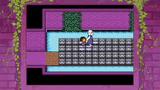 "Ruins" border, the Dynamic border in the Ruins.
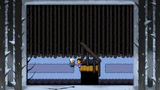 "Snowdin" border, the Dynamic border in Snowdin.
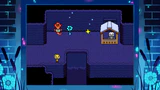 "Waterfall" border, the Dynamic border in Waterfall.
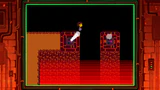 "Hotland" border, the Dynamic border in Hotland.
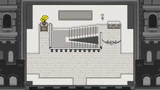 "Castle" border, the Dynamic border in New Home.
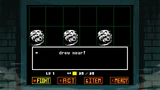 "True Lab" border, the Dynamic border in True Lab.
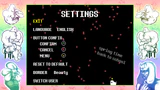 "Beauty" border unlocked after completing Hard Mode.
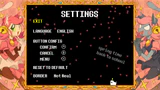 "Real/Not Real" border unlocked after defeating Mad Mew Mew in the Nintendo Switch version.
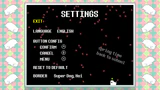 "Super Dog, Hoi" border unlocked after using the Annoying Dog in the artifact room.
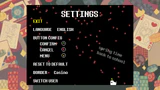 "Casino" border unlocked after upgrading the Dog Shrine in the Xbox One/Xbox Series X|S version.


The music, visuals, the Annoying Dog, and text change depending on what season it is when the game launches. These correspond with the Northern Hemisphere seasons, meaning players in the Southern Hemisphere see themes that are opposite to their current season.
- Winter: Uwa!! So Holiday♫ plays. Snowflakes fall, and Annoying Dog wears a Santa hat and a red scarf. The text above it is "cold outside but stay warm inside of you".
- Spring: Uwa!! So Temperate♫ plays. Pink leaves/petals fall, and Annoying Dog has a yellow flower sprouting from its head. The text beside it reads "spring time back to school".
- Summer: Uwa!! So HEATS!!♫ plays. The sun slowly moves in a circle and continuously shrinks and grows, and the dog rises and falls. Text above the dog reads "try to withstand the sun's life-giving rays".
- Autumn: Uwa!! So Temperate♫ Many different colored leaves fall, while the Annoying Dog has a leaf on its head, and text above it is "sweep a leaf, sweep away a troubles".
 Winter
 Spring
 Summer
 Autumn


- If the Settings menu is accessed before naming the fallen human, the Annoying Dog and music is absent.
- If the protagonist stands still long enough while they have the Sepia border in any console edition, the flowers depicted on the border start to spin.
- The "Beauty" border consists of art that was used during the Undertale Kickstarter updates.
- The Mad Mew Mew border is named based on the protagonist's answer to Undyne's question during Alphys's date. If the border is earned before the event, the border is unnamed.
- The "Casino" border features art of Toriel, Sans, Papyrus, as well as Lancer, C. Round, and Jevil from Deltarune.
- Occasionally (a 1 in 50 or 2% chance), when pressing the "Reset to Default" button, it reads "spaghetti" in place of "resetting".[3][4]
- In the Joystick Config menu, if the player has no SAVE file, the Analog Sensitivity bar is set to approximately three-fourths of the way across by default. However, using the "Reset to Default" option places it halfway across.
- If two devices that are recognized as a gamepad are plugged in, the game may ignore the presence of one of the input devices; unplugging the other input device causes the gamepad to be immediately responsive. This occurrence may be a glitch or oversight.
| Version tag | Changes |
|---|---|
| v1.05 | Changed name from "Joystick Config" to "Settings" in the Main Menu, which now always appears regardless of whether a controller is connected. Relocated the Joystick Config menu to an option within the new Settings menu. |
- ↑
BUT… since Undertale's native resolution is displayed in a 4:3 format, we called on original Undertale artist Temmie Chang to create some optional borders that can be turned on to fill the space surrounding the screen.
— Breaking Down Borders: Undertale's Journey to Japan and Back (Ricciardi, John, August 08, 2017.) PlayStation.Blog. - ↑
The PS4 and Vita versions of UNDERTALE will have optional border art by @tuyoki to fill the unused parts of the screen.
— Toby Fox (@tobyfox) on Twitter, August 08, 2017. - ↑ gml_object_obj_settingsmenu_draw_0 script, line 240
- ↑ gml_object_obj_joypadmenu_draw_0 script, line 355